
Remove Background from GIF Online
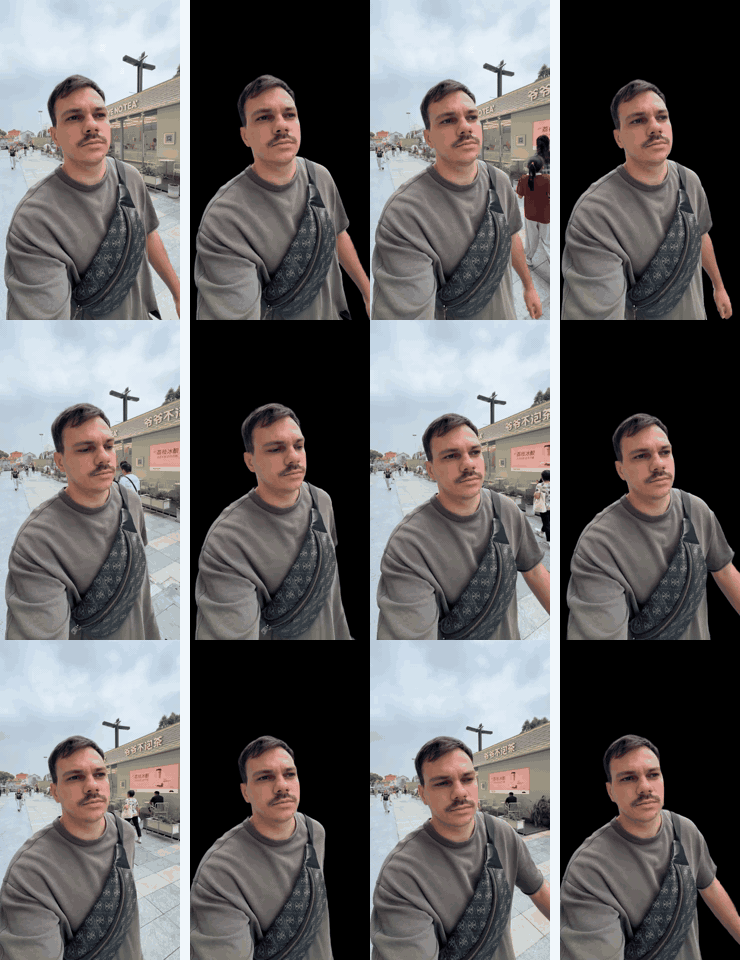
Upload an animated GIF and remove its background in a few clicks. The AI finds the person, animal or object on every frame of the animation and erases everything behind it, so you get a GIF background removed cleanly — no frame-by-frame editing.
How to remove the background from a GIF
1. Upload your GIF to the GIF background remover above.
2. Let AI remove the background on every frame of the animation.
3. Download the result with a transparent background and use it in chats, stickers, websites or video edits.
Why use an AI GIF background remover
Most GIF tools remove one colour across all frames. That works for a flat white or green backdrop, but fails on real footage — photos, shadows, gradients and moving cameras. The AI looks for the subject itself, so it works on:
- Animated GIFs made from video — reactions, memes, clips.
- GIFs with a white or black background — remove the backdrop without eating light or dark details of the subject.
- Busy backgrounds — rooms, streets, outdoor scenes.
What you can do with a transparent GIF
- Stickers and reactions for Telegram, Discord, Slack and other chats.
- Overlays for videos, streams and presentations.
- Website and email graphics that blend into any background colour.
- Memes placed over new scenes.
Also works with videos
The same tool removes backgrounds from MP4, MOV and M4V videos — see the video background remover. Shot on a green screen? Use the green screen remover.
FAQ
How do I remove the background from a GIF?
Upload the GIF to the tool at the top of this page, wait while the AI processes every frame and download the result with a transparent background.
Can I remove a white background from a GIF?
Yes. White, black and other solid backgrounds are removed together with any other background around the subject.
Can I remove the background from an animated GIF?
Yes — the AI processes every frame of the animation, not just the first one.
Is the GIF background remover free?
You can try it for free on 1 minute of video or animation, then choose a minute pack on the pricing page.